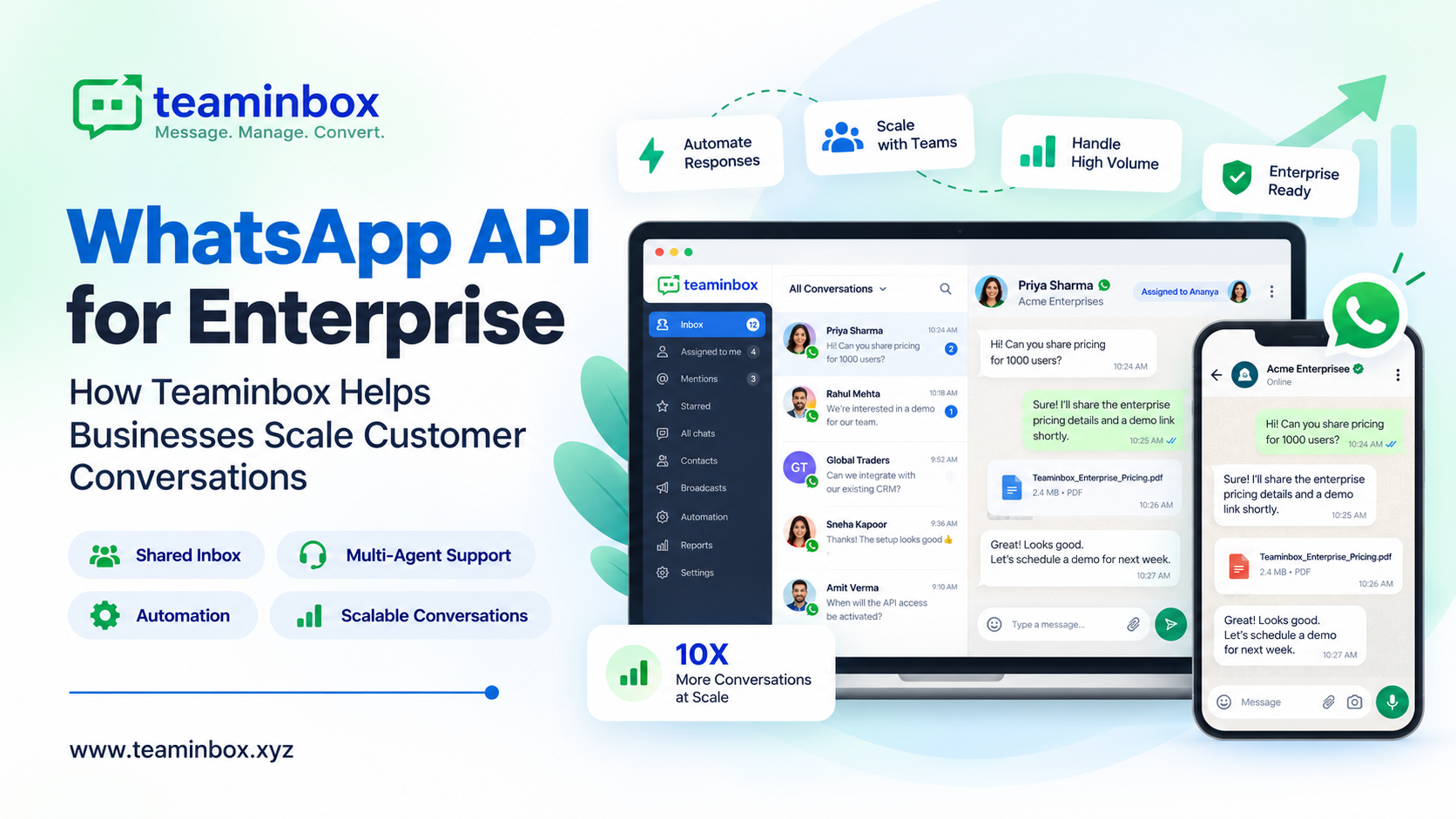

Why enterprises are moving customer conversations to WhatsApp
When did you last call a shop to ask if something was in stock? For most of us, it’s been a while. We just send a WhatsApp. That habit is why so many large businesses are now looking at the WhatsApp API for enterprise communication.
Your customers do the same. It’s quicker than a form, and nobody enjoys hold music.
That’s easy when one owner answers every chat. It’s a different story with 40 sales reps, all replying from their own phones.
Priya goes on leave, and her leads hear nothing for a week. Rahul quits, and two years of chats leave with him. Someone tries a cheap bulk tool, and by Friday the number is banned.
So should you give up on WhatsApp? Not at all. The fix is to move your team onto the official WhatsApp Business API, which is built for enterprise use.
In this guide to the WhatsApp API for enterprise, we’ll explain how it works, what changes for a large team, and what Teaminbox adds.
What is the WhatsApp Business API for enterprises?
Meta built the WhatsApp Business API for medium and large firms that have outgrown the free Business App. For an enterprise, it’s the only official way to run WhatsApp at scale.
Here’s the part that confuses people: the API has no app or screen. You can’t download it. You plug it into a platform like Teaminbox, and that’s where your team actually reads and answers chats.
A few years ago, firms could run the API on their own servers. Meta has shut that down, and everyone now uses the Cloud API.
That’s good news for your IT team. There’s no server to look after. The real choice is which platform you use.
| Capability | WhatsApp Business App | WhatsApp Business API with Teaminbox |
|---|---|---|
| Users | One phone plus a few linked devices | Multiple agents and teams on one number |
| Conversations | Stored on individual devices | Centralised shared inbox with full customer timeline |
| Automation | Basic greeting and away messages | Auto-replies, keyword triggers, chatbot flows, smart routing |
| Outbound messaging | Manual, small-scale broadcasts | Meta-approved templates, campaigns and broadcast sequences |
| Lead management | Not available | Automatic lead capture, pipelines, notes and follow-ups |
| Integrations | None | APIs, webhooks, and lead sync from Meta Ads, Google Ads, and LinkedIn |
| Scale | Suited to small businesses | Built for growing teams and multi-number rollouts |
Your team likes the WhatsApp Business App? Keep it. With number coexistence, your number runs on the app and the API at the same time. Same SIM, same chats.
6 benefits of the WhatsApp Business API for enterprises
The first benefit of the WhatsApp Business API for enterprises is safety. Cheap spam tools are the quickest way to get a number banned, and the official API keeps you on the right side of WhatsApp.
Then there’s the team. Ten agents or fifty can work off one number, so nobody has to say “just send it to my personal WhatsApp” again.
Customers get answers faster, too. If someone texts “open tomorrow?” at 11 pm, a bot replies before they’ve put the phone down.
Leads stop slipping away. Every chat has an owner and a stage, which ends the old “I thought you were following up” problem.
There’s another upside. You don’t have to wait for customers to message you. With approved templates, you can tell thousands of people their order has shipped, their payment is due, or your Diwali sale has started.
And costs stay clear. Since July 2025, Meta has charged per delivered template message, based on message type and country. We pass that on as it is, with no markup.
6 ways enterprise teams use the WhatsApp Business API
Sales is often the first team to use the WhatsApp API. Your rep opens Teaminbox and sees two new leads, one from Instagram and one from the website form. She replies to both without leaving WhatsApp.
Support teams like having the history on screen. If a customer asked about a refund last month, the agent can see it and won’t ask for the order number again.
Marketing uses it for things like a Diwali sale broadcast, or a short welcome series for first-time buyers.
Reminders mostly run themselves. You type “Your plan renews Friday” once, pick the date, and Teaminbox does the rest.
Running three brands, or offices in Pune, Delhi and Bengaluru? Give each a number of its own. You’ll still see all of them from a single login.
Shops and field teams don’t have to change much either. Store staff keep the Business App they’re used to, while head office runs campaigns and reports from Teaminbox on the same number.
Teaminbox: the WhatsApp CRM built for enterprise teams
Where does Teaminbox come in? We’re a WhatsApp CRM and automation platform, built on top of the official WhatsApp Business API.
Many teams juggle a chat app, a spreadsheet, and a separate CRM. Teaminbox puts chats, leads, and workflows together. Here’s how that works in practice.
Shared team inbox: one WhatsApp number for every agent
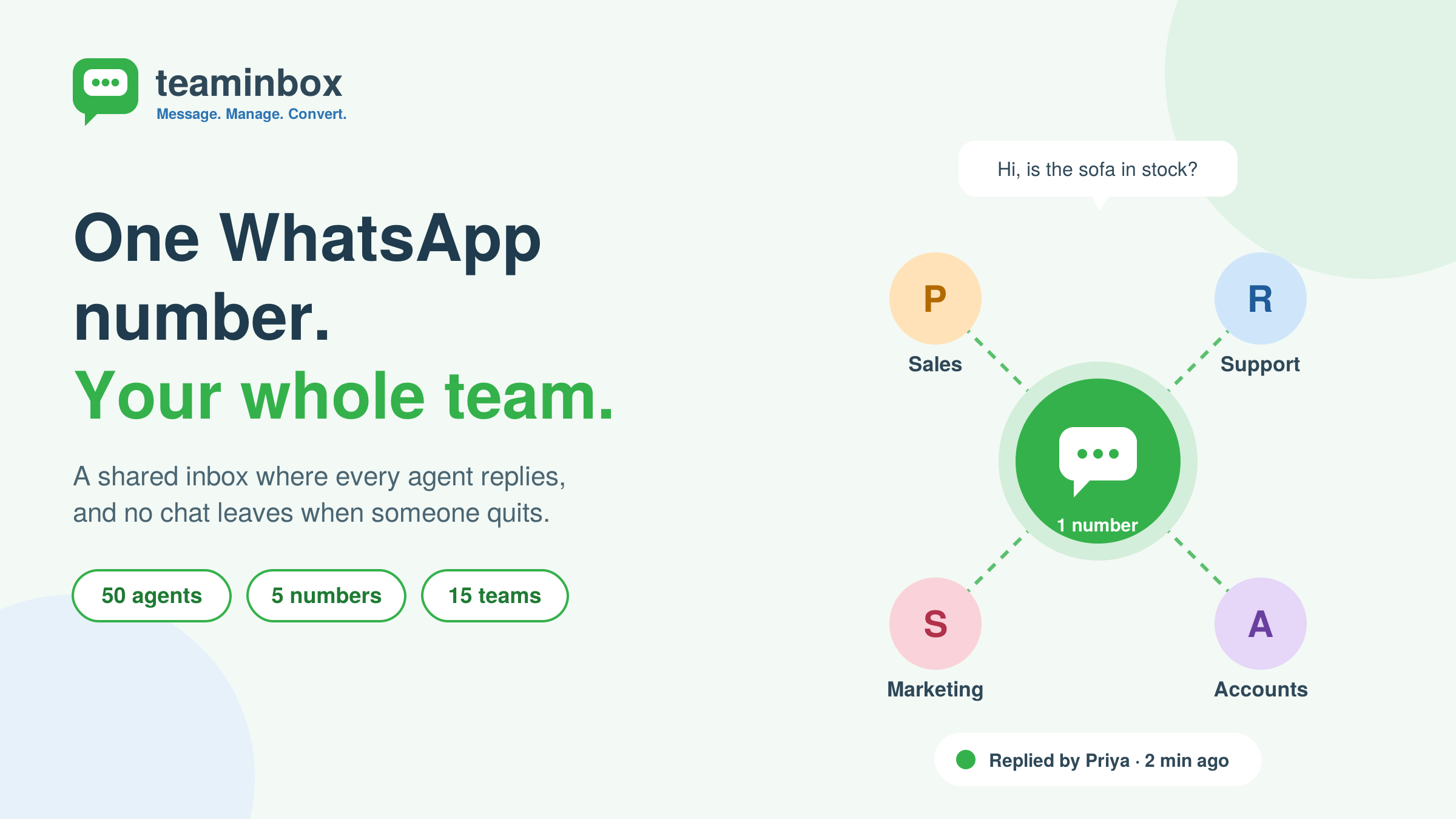
Shared team inbox one WhatsApp number for every agent
Every chat comes into one WhatsApp shared inbox. Agents reply live, and they can drop a note for a teammate that the customer never sees.
Want billing questions to go to accounts and bulk orders to go to sales? Set a rule once. Nobody sorts chats by hand after that.
WhatsApp lead management that captures every enquiry
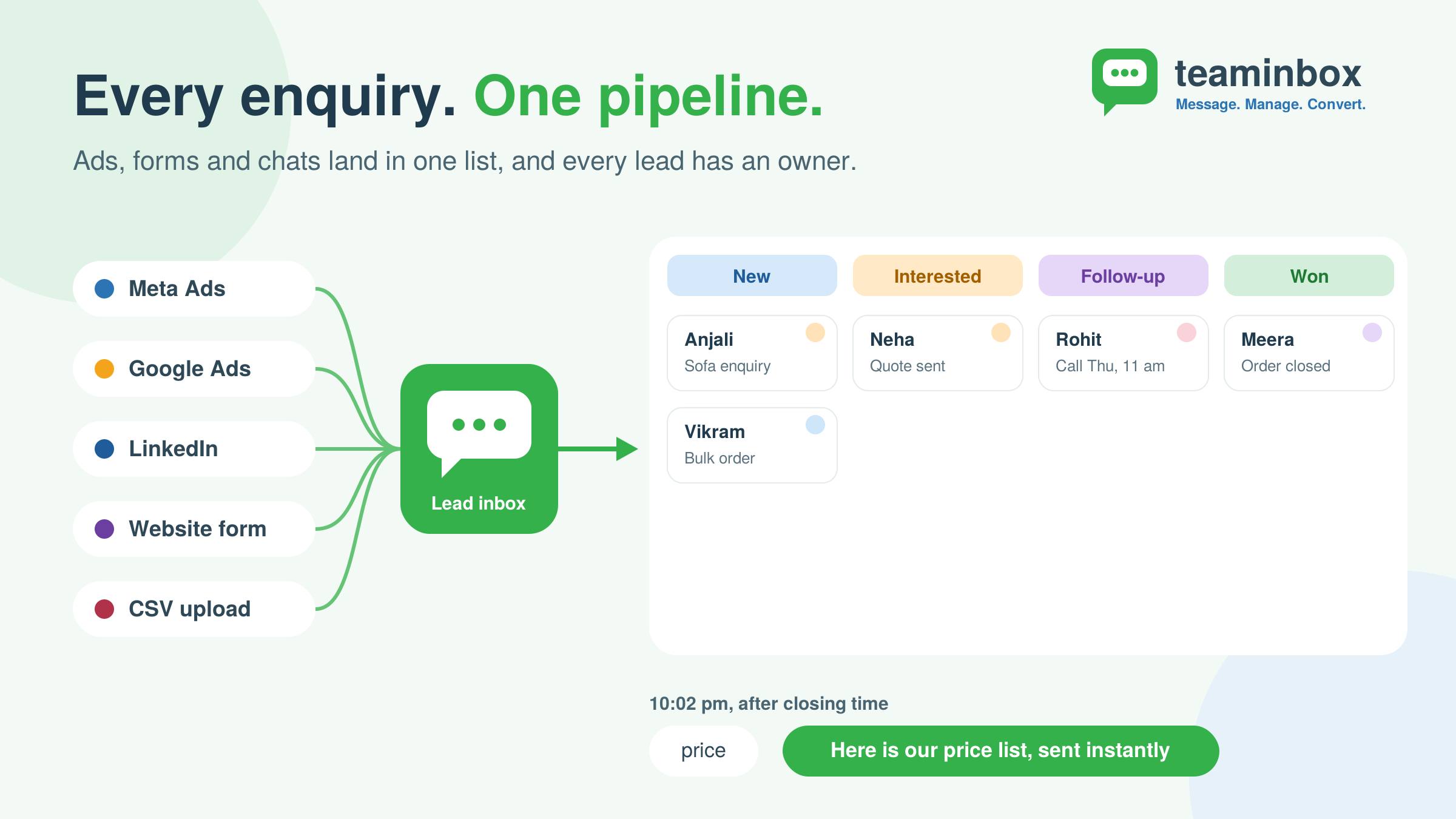
WhatsApp lead management that captures every enquiry
With Teaminbox, WhatsApp lead management happens on its own. Say a new customer messages your furniture store about a sofa. She’s added to your leads list right away, so nobody types her number into Excel. Your rep marks her as “interested,” takes ownership, and sets a reminder for Thursday.
Your next lead might come from a Facebook ad. The one after that, from your website form. Google Ads, LinkedIn, a CSV someone uploads on Monday morning: it all lands in one list. So when that sofa finally sells, you can point to the exact ad that started it.
WhatsApp automation and chatbots for 24/7 replies
People message after closing time. A lot. WhatsApp automation makes sure they still get an answer. Someone types “price” at 10 pm, and a keyword trigger sends the price list back straight away. No awkward silence until morning.
A WhatsApp chatbot deals with the stuff your team hears ten times a day. “When will it be delivered?” “Are you open Sunday?” Anything trickier gets passed to an agent who’s free. Got a follow-up due? Teaminbox pings the person who owns it.
Bulk WhatsApp broadcasts and message scheduling
Weekend sale coming up? Send it out with bulk WhatsApp broadcasts and approved templates, to thousands of customers in one go. Want Delhi and Mumbai to get different offers? Split the list before you hit send.
Not every message should go out in one shot. With a broadcast sequence, a new buyer might get a thank-you note today and sofa care tips on Thursday. Message scheduling handles the timing. Pick a date and hour, or repeat it weekly or monthly, and change it any time before it sends.
WhatsApp number coexistence: keep the app, add the API
Plenty of firms hold off on the API because their staff is attached to the app. With number coexistence, nobody has to give it up.
We link your number to the Cloud API, and the app carries on as normal. Chats sync both ways, and your verified status stays. Most teams are up and running inside 48 hours, and coexistence is included in every plan.
WhatsApp website chat widget and mobile inbox
Put the website chat widget on your site, and a visitor can start a WhatsApp chat in one tap. Out in the field? Agents can reply from the mobile app.
WhatsApp API integrations, webhooks and reporting
Got developers? They’ll like our API docs, webhooks, and contact and event APIs. Use them to hook WhatsApp into your CRM.
Each message shows if it was delivered, read or failed. You’ll know what’s working and what isn’t.
Teaminbox Enterprise plan: features and pricing
Running many numbers or big campaigns? Here’s what the Enterprise plan gives you:
| Feature | Enterprise plan |
|---|---|
| Agent seats | 50 |
| WhatsApp numbers | 5 |
| Contacts | 1,00,000 |
| API calls per month | 2,00,000 |
| Teams | Up to 15 |
| Automation runs per month | 20,000 |
| Events and custom contact fields | 50 events, 25 custom fields |
| Support | Dedicated account manager, priority and on-call support with SLA |
| Price | ₹14,999 per month, excluding GST |
All plans come with coexistence, help with API setup and zero markup on Meta fees. Full details are on the pricing page.
How to set up the WhatsApp Business API with Teaminbox in 7 steps
Have these ready before you set up the WhatsApp Business API:
- A Meta Business Manager account and your business documents
- A phone number (your current Business App number is fine)
- A card or other way to pay Meta’s fees
- A rough idea of which teams will use it
- Pick a plan: Work out roughly how many agents, numbers, and contacts you’ll need. If it’s a big rollout, book a demo, and we’ll help you size it.
- Connect your number: You’ll do this through Meta’s Embedded Signup. If the number is already on the Business App, coexistence keeps it there.
- Get verified: Meta reviews your business and number. We’ll help with the paperwork, and with the blue tick if you want it.
- Set up your workspace: Add agents, group them into teams, decide where each type of chat should go, and build your pipelines.
- Add templates and automation: Write your templates and send them to Meta. Approval can take a little while, so set up your bots and auto-replies in the meantime.
- Connect lead sources: Hook up your ad accounts, LinkedIn, website forms, or a CSV. Anything else can plug in through our APIs and webhooks.
- Go live and improve: For the first few weeks, keep an eye on delivery, read, and reply rates. They’ll tell you pretty quickly what to tweak.
7 WhatsApp Business API best practices for enterprises
- Get consent: Only message people who’ve asked to hear from you. Skip this, and your number is at risk, however good the message is.
- Pick the right template type: Meta has three buckets: marketing, utility, and authentication. File an order update under “marketing,” and you may wait longer for approval.
- Make it personal: “Dear customer, your order is on its way” is easy to ignore. “Hi Ankit, your blue sneakers ship today” isn’t.
- Know the 24-hour rule: The clock starts when a customer messages you. For the next 24 hours, write whatever you want. After that, you’ll need an approved template.
- Send at the right time: A renewal reminder at 2 am gets ignored, or worse, gets you blocked. Daytime, a day or two before the due date, works better.
- Mix bots and people: Bots are fine for “what are your timings?” But if someone’s upset about a refund, or about to place a ₹5 lakh order, get a person on it.
- Check your results: Look at your reports every couple of weeks. If read rates are low, try a different time or a shorter message.
FAQs about the WhatsApp API for enterprise
What is the WhatsApp API for enterprise?
It’s Meta’s official WhatsApp Business API, used by medium and large businesses to message customers at scale. Platforms like Teaminbox add a shared inbox, automation, and lead management on top.
Is Teaminbox an official WhatsApp solution?
Yes. We’re built on the official WhatsApp Business API. Spam, scraped lists, and rule-breaking aren’t allowed.
Can I keep using the WhatsApp Business App after connecting to Teaminbox?
Yes. Coexistence keeps the app working on the same number, and chats sync both ways.
Can multiple agents use one WhatsApp number?
Yes, that’s what the shared inbox is for. On the Enterprise plan, you get 50 seats, 5 numbers, and up to 15 teams.
Can Teaminbox manage leads from sources other than WhatsApp?
Yes. Meta Ads, Facebook, Google Ads, LinkedIn, web forms, and CSV files can all feed the same pipeline.
Does Teaminbox charge extra on Meta’s messaging fees?
No. You pay Meta’s own rates, nothing more. Plan prices are separate and exclude GST.
How long does WhatsApp Business API setup take?
Usually under 48 hours with coexistence. It depends on Meta’s checks for your number and country.
Start scaling enterprise WhatsApp communication with Teaminbox
Your customers already chat with businesses on WhatsApp. They ask, compare, and buy there. That’s why the WhatsApp API for enterprise is worth getting right.
The firms that do well treat it like a real sales channel, with clear owners, clear rules, and numbers they can check.
That’s the gap Teaminbox fills. Think of it as the official WhatsApp Business API, made usable for a big team. Everyone shares one inbox. Leads save themselves. Bots handle the 11 pm “are you open?” messages. And thanks to coexistence, the app stays on your phone. Less phone-swapping, more deals closed.
The easiest way to judge it is to try it. Start a free trial and connect your own number. Prefer a chat first? Book a demo. Or just drop us a line at info@teaminbox.xyz, or call +91 73111 55211.