
What is the official business WhatsApp API?
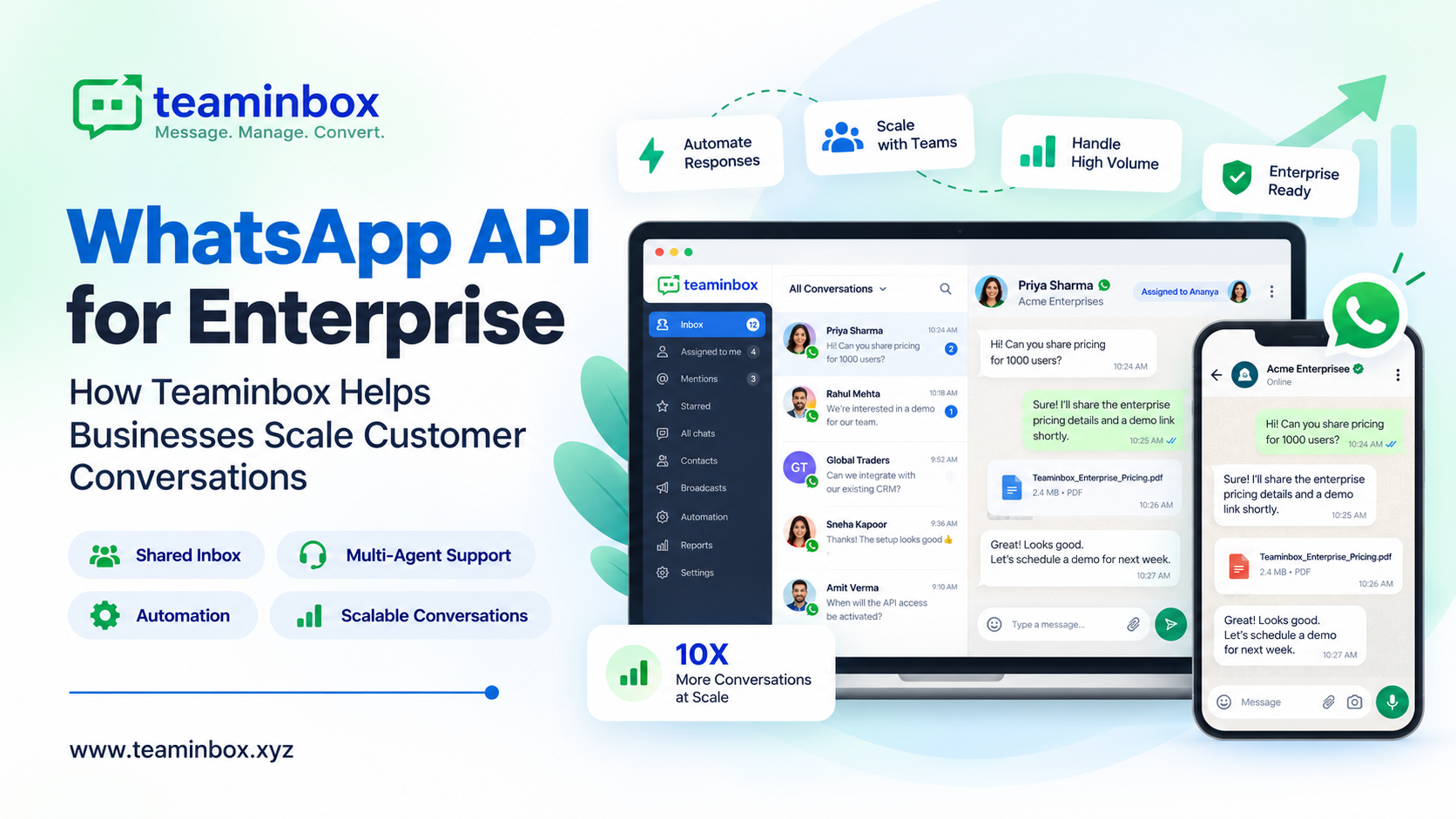
The official business WhatsApp API is simply Meta’s approved way for a company to use WhatsApp through software, not through one phone that everyone keeps passing around. These days Meta calls it the WhatsApp Business Platform. Once your number is on it, five or fifty people can reply from the same verified number, and you can add a chatbot for after-hours questions.
Most businesses today go with the WhatsApp Cloud API, which Meta hosts itself. You won’t need to hire a developer for it either. Most teams just sign up on a platform that’s already connected to the API, like ours at Teaminbox, and let it handle the setup, the shared inbox, templates, automations, and reports.
We wrote this guide for teams that already sell to or support customers on WhatsApp and have outgrown the single office phone. We’ll explain how the API works, what you’ll actually pay in India now that Meta’s October 1, 2026 pricing update is live, the steps to apply, and how we at Teaminbox can help.
Quick answer: It’s the business version of WhatsApp that Meta approves for teams messaging lots of customers. You’ll need a Meta Business portfolio, a phone number, a display name Meta accepts, and a platform like Teaminbox to manage your chats. After that, Meta bills you per delivered message, and the rate depends on the message type and where your customer’s number is registered.
WhatsApp Business App vs the official WhatsApp Business API
The WhatsApp Business App was made for one person and one phone, like a boutique owner answering orders between customers. It costs nothing, and for a small setup it’s honestly enough. Things change once three or four people need to reply from the same number, or you want automatic replies and a link to your CRM. That’s where the API comes in, and that’s also where Meta starts charging per message.
| What you need | WhatsApp Business App | Official WhatsApp Business API |
|---|---|---|
| Cost from Meta | Free app | Per delivered message, by category and country |
| Who replies | Owner on a phone plus linked devices | Many agents through a shared team inbox |
| Automation | Basic greeting and away messages | Chatbots, keyword triggers, routing, scheduled messages |
| Outbound messages | Manual, small broadcast lists | Meta-approved templates sent at scale |
| Integrations | Very limited | APIs and webhooks to CRMs and other tools |
| Verified badge | Through the paid Meta Verified subscription | Official Business Account review by Meta |
| Reporting | Basic | Sent, delivered, read, and failed status per message |
A lot of owners hold back because they don’t want to give up the number customers already have saved. You may not have to. With Meta’s number coexistence, an eligible number keeps working in the WhatsApp Business App while it’s also connected to the Cloud API. We support this on every Teaminbox plan, and there’s more on it further down.
Official vs unofficial WhatsApp API: is the unofficial route safe?
Most “unofficial WhatsApp APIs” work by automating an ordinary WhatsApp or WhatsApp Business App account, usually through a WhatsApp Web session or a modified version of the app. Meta hasn’t approved them, and using them breaks WhatsApp’s terms.
Can your number get banned? It can. WhatsApp restricts and bans numbers that send automated or bulk messages outside the Business Platform. If that’s the number printed on your visiting cards and saved in your customers’ phones, you could lose the channel, and the chat history along with it, without any warning.
The official route asks for a bit more paperwork up front. In return, you get a setup Meta itself stands behind:
- Messages travel through Meta’s own systems, so there’s no workaround that can suddenly stop working.
- Anything you send first goes out as a Meta-approved template, and only to people who said yes to hearing from you.
- Meta rates the quality of your number. If customers start blocking you, you’ll notice early and can change course.
- Your number sits under a verified Meta Business portfolio, with a display name Meta has approved.
To be clear about where we stand: Teaminbox only works on the official WhatsApp Business API. We don’t support spam blasts, number scraping, or any other trick that goes against WhatsApp’s policies.
How to get the official WhatsApp Business API in India
You apply through Meta, but in practice most businesses do it with a platform that walks them through Meta’s Embedded Signup. Here’s the WhatsApp Business API registration process from start to finish.
- Set up a Meta Business portfolio. If you’ve run Facebook ads before, you may already have one in Business Manager. Just make sure you’re an admin on it.
- Pick the number. A new SIM works. So does your current WhatsApp Business App number, if it’s eligible for coexistence.
- Decide on a display name. Meta reviews it, so keep it close to your actual business or brand name.
- Connect through Embedded Signup. Your platform opens Meta’s official signup window, which links your number to a WhatsApp Business Account (WABA) and to the Cloud API.
- Verify your business. This is Meta Business Verification, where you upload your business details and documents to show you’re a genuine business.
- Send your templates for approval. Meta checks every template before you can use it to start a conversation.
- Go live and build up your limit. Message people who opted in, keep complaints low, and Meta can raise your messaging limit over time.
What documents are required for WhatsApp Business API approval?
All Meta really wants to confirm is that the business name and address you entered are real and match an official document. For most Indian businesses, the GST certificate is the easiest proof. If you don’t have GST, a certificate of incorporation, Udyam registration, or shop and establishment licence can work instead. It also helps to have a working website on your own domain and a business email or phone number. Check the spelling of your business name carefully. It should be identical on the document and in your Meta Business portfolio.
Do I need Meta Business Verification for the WhatsApp API?
Not to get started. You can usually send messages with a low messaging limit before you’re verified. But if you want to grow past that limit, or apply for the verified badge, you’ll need to be verified.
How long does WhatsApp Business API approval take?
Honestly, it depends more on Meta than on us. Linking your number through Embedded Signup doesn’t take long, but business verification and template approvals happen on Meta’s timeline. On our end, once you subscribe, we’ll help you get your WhatsApp number connected within 24 hours.
What is a WhatsApp Business Solution Provider (BSP)?
BSP stands for Business Solution Provider. These are Meta partners that give businesses access to the WhatsApp Business Platform, and most of them bundle in software and setup help. When you’re shortlisting one, check two things: that they onboard you through Meta’s official process, and that your WhatsApp Business Account stays under your own Meta Business portfolio, not theirs.
How Teaminbox helps you get started
Every plan we offer includes Official WhatsApp API Assistance and Meta Business Verification Assistance, so you’re not doing the paperwork alone. Before we start, keep these ready: admin access to your Meta Business Manager, a business that complies with WhatsApp’s Commerce Policy and Meta’s business terms, and a phone number that isn’t active on the WhatsApp app. Want to keep the app on your phone? Then we’ll set you up with number coexistence instead.
Official WhatsApp Business API pricing in India (October 2026)
Your bill has two parts. One is what Meta charges per message, and the other is your platform’s monthly fee. So the API isn’t free. That said, customers can message you as much as they like at no cost, and each number gets a batch of free service messages every month.
Meta’s charges
Since July 1, 2025, Meta charges per delivered message instead of per conversation. The rate depends on the message category and the customer’s country code. For customers in India, Meta’s published rates are:
| Message category | Typical use | Meta rate in India (per delivered message, excl. GST) |
|---|---|---|
| Marketing | Offers, launches, re-engagement | ₹0.8631 |
| Utility | Order updates, reminders, account alerts | ₹0.115 |
| Authentication | OTPs and login codes | ₹0.115 |
| Service | Free-form replies inside the 24-hour window | First 1,000 per number each month free, then ₹0.115 |
Two changes took effect on October 1, 2026. Service messages are now charged after 1,000 free per business phone number each month, and utility templates sent inside an open 24-hour window are now charged too. Messages customers send to you remain free.
There’s one more freebie worth knowing about, called the free entry point window. If someone taps your Click-to-WhatsApp ad or the WhatsApp button on your Facebook Page from their phone, and you reply within 24 hours, every message you send them for the next 72 hours is free. Meta can change its rates at the start of any quarter, so take a look at Meta’s current pricing page before you set a budget.
Teaminbox plans
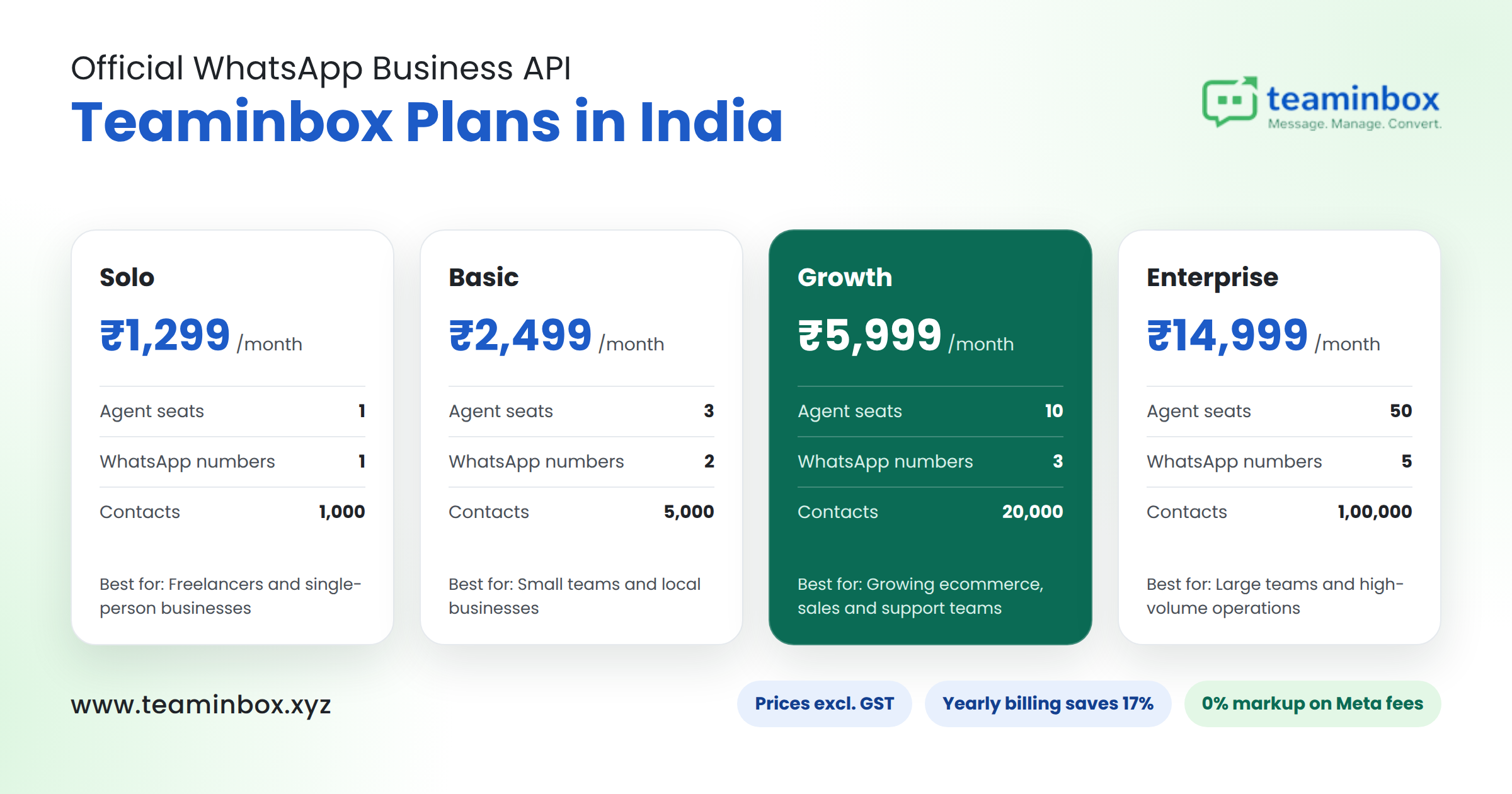
We charge a fixed monthly fee and put 0% markup on Meta fees. Whatever Meta charges for a message is what you pay, with nothing added by us. You’re billed in rupees, and the prices below don’t include GST.
teaminbox-plans-pricing
Yearly billing saves you 17%. If you’re in India, you can pay us by UPI, NEFT or a payment link, or set up auto-renewal on an Indian debit or credit card through Razorpay. We email a GST invoice with every payment. Every plan starts with a free trial, and you can see the full feature list on our pricing page.
Example: say you’re on our Basic plan and send 2,000 marketing messages and 3,000 utility messages to Indian customers in a month. You’d pay us ₹2,499, plus about ₹1,726 for marketing and ₹345 for utility to Meta, plus GST.
Official WhatsApp API with green tick: how verification works now
People still call it the “green tick”, but the badge for an Official Business Account (OBA) is now a blue checkmark, the same style you see on Facebook and Instagram. The search term just hasn’t caught up yet.
A few things worth knowing before you apply:
- It’s Meta’s call. Meta reviews every request and mostly looks at how well-known your brand is. Nobody can sell you the badge or promise you’ll get it.
- Sort out the basics first: a verified Meta Business portfolio, an approved display name, and a number on the WhatsApp Business Platform.
- Press coverage helps. Genuine news articles about your business are one of the usual ways to show Meta you’re notable.
- It won’t change your limits or prices. The badge is about trust; your messaging limit and Meta’s rates stay the same.
- Meta Verified is a separate thing. It’s a paid subscription that also comes with a verified badge, and what you get depends on your account and region.
On our Basic, Growth, and Enterprise plans, we include WhatsApp Blue Tick Assistance. We’ll help you put the application together and submit it. The final yes or no still comes from Meta.
The rules that keep your number healthy
Meta doesn’t hand you a huge rulebook here. There are really four or five things to get right. Follow them and your number stays trusted, and your sending limit has room to grow.
Business-initiated vs user-initiated messages and the 24-hour window
Say a customer sends you “Is this available in blue?” at 3 pm. That opens a 24-hour customer service window, and until 3 pm the next day you can reply normally with text, photos, a PDF price list, anything. If they don’t write back in that time, the window shuts. After that, you can only message them with an approved message template, and the same goes for any chat your business starts on its own.
WhatsApp message templates and approval
There are three kinds of templates: marketing, utility, and authentication. Meta reviews each one, and if your content doesn’t fit the category you picked, Meta can move it to another. Each category is priced differently, so keep utility templates strictly about orders, bookings, or accounts, and save offers for marketing templates.
Opt-in and consent management
Only message people who’ve said yes for a clinic, that might be a tick box on the appointment form. For an online store, it could be a line at checkout saying order updates will come on WhatsApp. Some customers will reply “STOP” or ask to be removed, and when that happens, take them off your list the same day.
Messaging limits and quality rating
Meta caps how many different customers you can reach with templates in any rolling 24-hour period. New accounts start low, and the cap can go up as you keep sending messages people actually want. Meta also rates your number’s quality based on how customers react, and blocks and reports drag it down. The easiest way to protect it is to message only people who opted in, about things they care about.
Phone number registration and migration
A number connected only to the API can’t be used in the regular WhatsApp app at the same time. Coexistence is the exception: an eligible WhatsApp Business App number keeps working in the app while it is also on the Cloud API, with chats synced between the two.
What you get with Teaminbox on the official WhatsApp Business API
Teaminbox is the WhatsApp CRM and automation platform we built in Lucknow, on top of the official WhatsApp Business API. We put chats, leads, and campaigns in one dashboard, so your sales and support people aren’t jumping between three apps all day.
Shared team inbox and multi-agent support
Your whole team works from one WhatsApp number. Open any customer and the whole chat history is there. Agents can put labels on chats, jot a note on a contact (“wants bulk pricing, call after Diwali”), send saved quick replies, and answer from the mobile app inbox when they’re out of the office. Nobody has to hand over their personal phone anymore.
Lead management built in
Every time someone new messages you, we can add them as a lead automatically. You set the pipeline stages yourself (for example, New, Interested, Quote sent, Won) and give each lead an owner. Notes, tags and follow-up reminders are saved on the lead itself. Leads coming in from Facebook (Meta) ads, Google Ads, LinkedIn lead forms, website forms, and CSV uploads show up in the same list, so nobody has to copy-paste between Excel files.
Broadcasts and scheduled messaging
With broadcasts, you can send an approved template to all your opted-in contacts or only a chosen group. It can go out now or at a time you pick. For things like fee reminders or weekly offers, set a daily, weekly or monthly schedule once, and it runs on its own. Each message can be personalised, so customers don’t feel like they got a mass forward.
Chatbots and automation
Auto-replies, keyword triggers, business-hours rules and automatic follow-up reminders take care of the repetitive stuff. On the higher plans, you also get chatbot flows, trigger chatbots, and smart routing, which passes each chat to the right agent based on rules you set.
Number coexistence
Keep using the WhatsApp Business App on your phone while your team works the same number from our inbox. We include it on every plan, subject to Meta’s eligibility check for your number.
Delivery reports and tracking
We show you whether each message was delivered, read, or failed, so your team knows what actually reached customers.
Integrations and developer access
If you have developers on your side, every plan comes with Messaging API access, and our API documentation is public. From the Basic plan up, you can also use outbound webhooks to send WhatsApp events straight into your CRM or any other tool you use.
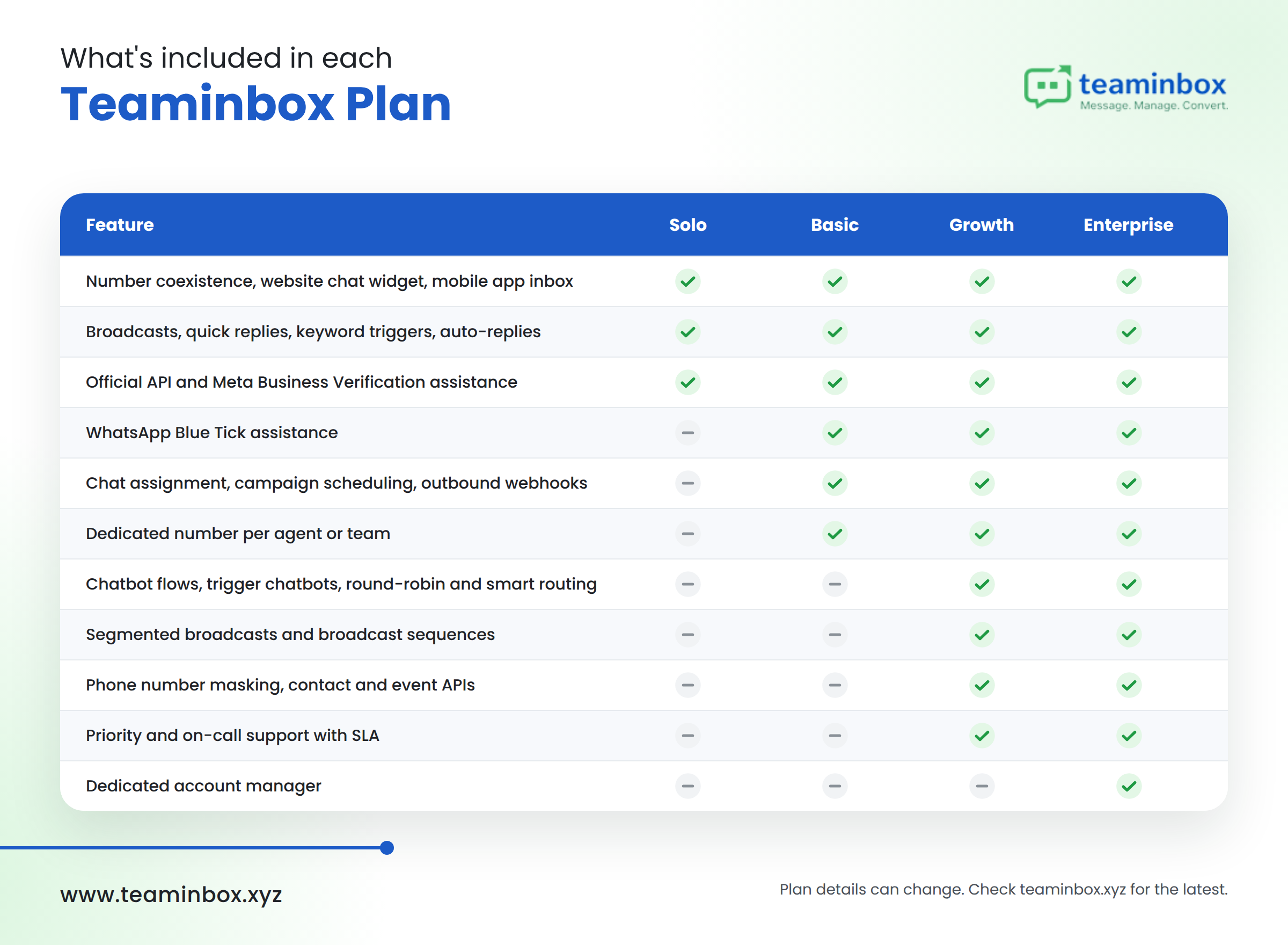
Which plan includes what
teaminbox-features-by-plan
We update our plans from time to time, so check the current list on our plan comparison page before you buy.
How to choose the best official WhatsApp Business API provider in India
The best provider is the one whose costs, features, and support fit how your team actually works. We’d suggest asking every provider these questions, us included:
- Is it official? It should connect you through Meta’s Embedded Signup and keep your WhatsApp Business Account under your own Meta Business portfolio.
- Is there a markup on Meta charges? Some platforms add a margin on each message. We charge 0% markup on Meta fees.
- How do you pay? Check for INR billing, UPI or NEFT options, and GST invoices if you claim input tax credit. We offer all three for Indian customers.
- Can you keep your number? Ask whether number coexistence is supported if you want to keep using the WhatsApp Business App.
- Does it include onboarding help? Look for help with API setup, Meta Business Verification, templates, and the verified badge.
- Does it fit your team size? Compare agent seats, numbers, contact limits, and how chats are assigned.
- Does it go beyond messaging? A built-in lead pipeline saves you from copying chats into a separate CRM.
Which Teaminbox plan fits you?
- Small businesses and freelancers: Solo gives one agent the official API, broadcasts, and coexistence at ₹1,299 a month.
- Startups and small teams: Basic adds three agents, chat assignment, campaign scheduling, and blue tick assistance.
- Ecommerce and D2C brands: Growth adds chatbot flows, round-robin routing, segmented broadcasts, and broadcast sequences for higher volumes.
- Large teams and multiple brands: Enterprise supports 50 agents, five numbers, and a dedicated account manager.
Frequently asked questions
What is the official WhatsApp Business API?
It is Meta’s approved way for businesses to send and receive WhatsApp messages through software, officially called the WhatsApp Business Platform. It supports multiple agents, chatbots, approved templates, and integrations on one verified business number.
Is the WhatsApp Business API free?
No. Messages customers send you are free, and each business number gets 1,000 free service messages a month. Marketing, utility, and authentication templates are charged per delivered message, plus your platform’s subscription.
How much does the official WhatsApp Business API cost in India?
Meta charges about ₹0.8631 per marketing message and ₹0.115 per utility, authentication, or extra service message to Indian numbers, before GST. Our Teaminbox plans start at ₹1,299 a month, with 0% markup on Meta fees.
How to get the official WhatsApp Business API in India?
Set up a Meta Business portfolio, choose a number, connect it through Meta’s Embedded Signup with a platform like Teaminbox, complete Meta Business Verification, and get your templates approved.
What is the difference between an official and an unofficial WhatsApp API?
The official API is provided by Meta through the WhatsApp Business Platform. Unofficial tools automate regular WhatsApp accounts without Meta’s approval, which breaks WhatsApp’s terms.
Is the unofficial WhatsApp API safe to use?
No. It puts your number at risk of being restricted or banned, and you have no support from Meta if something goes wrong.
Can I use my existing WhatsApp number for the API?
Yes. You can move it to the API, or, if it is on the WhatsApp Business App and eligible, use number coexistence to run the app and the API on the same number. We include coexistence on every Teaminbox plan.
How to get a green tick on WhatsApp Business?
Apply for an Official Business Account through your provider once your business is verified and your number is on the API. Meta grants it based on brand notability, and the badge now appears blue.
Which is the best official WhatsApp API provider in India?
It depends on your team size, budget, and the features you need. If you want a shared inbox, lead management, number coexistence, INR billing, and no markup on Meta fees, we’d love for you to try Teaminbox with our free trial.
Get started on the official WhatsApp Business API
The official business WhatsApp API gives your team a stable, compliant way to run sales and support on WhatsApp without risking your number. Meta’s charges are clear and per message, and the right platform turns chats into tracked leads.
With Teaminbox, you get the official API with a shared inbox, lead management, broadcasts, automation and number coexistence, all with 0% markup on Meta fees and INR billing. Start your free trial or book a demo with us on WhatsApp. You can also reach us at info@teaminbox.xyz or +91 73111 55211.